Windows 8 Launcher1.0
Publisher Description
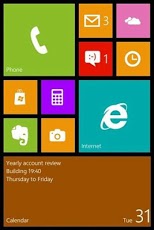
Bored of Android's User Interface? Do you want a new style start screen? If you do, then wait no more!Now get the experiance and user interface of Windows 8 and metro style apps.Launcher8 is a great app for you to experience the brand new style UI on your Android mobile phone.You can esay design look like Windows Phone 8 layout (fake wp8)and show off to your friends!You can see this UI on Lumia phones and nokia devices. And now its available on android too...If you are using samsung or htc phones and bored of Android User Experience then this is for you.The best UI for lumia phones is now available for your android phone too. This is complete similar to Windows 8 phones interface. The tile interface looks nice and beautiful.So grab it and share it with your friends too.You dont need any GoLauncher or any other launcher just install it abd have fun with it..
About Windows 8 Launcher
The company that develops Windows 8 Launcher is Funapp. The latest version released by its developer is 1.0. This app was rated by 1 users of our site and has an average rating of 4.0.
To install Windows 8 Launcher on your Android device, just click the green Continue To App button above to start the installation process. The app is listed on our website since 2013-05-23 and was downloaded 104 times. We have already checked if the download link is safe, however for your own protection we recommend that you scan the downloaded app with your antivirus. Your antivirus may detect the Windows 8 Launcher as malware as malware if the download link to dex.com.dex2 is broken.
How to install Windows 8 Launcher on your Android device:
- Click on the Continue To App button on our website. This will redirect you to Google Play.
- Once the Windows 8 Launcher is shown in the Google Play listing of your Android device, you can start its download and installation. Tap on the Install button located below the search bar and to the right of the app icon.
- A pop-up window with the permissions required by Windows 8 Launcher will be shown. Click on Accept to continue the process.
- Windows 8 Launcher will be downloaded onto your device, displaying a progress. Once the download completes, the installation will start and you'll get a notification after the installation is finished.
Program Details
System requirements
Download information
Pricing
Version History
version 1.0
posted on 2013-05-23
version 1.0
posted on 2013-05-23
Several fixes and updates
